
Screen printing is popular for creating designs and artwork on t-shirts, hoodies, and other clothing. Basically, it involves a screen and ink to print the designs. However, during printing, the screen gets dirty from ink, emulsion, and stains. This raises the question: How to clean a screen printing screen? If you keep using an uncleaned screen, it will affect the print details.
The reason is that ink will clog the mesh, resulting in bolder designs. These may not be suitable, especially when you need finer details. Additionally, cleaning also helps keep the screen usable for longer. In this article, I’ll explain the detailed procedure to help you clean your screen printing screen easily.
Why Is Cleaning Screen Printing Screens Important?
Cleaning the screen can be time-consuming. So you might wonder if you really need to do it. The answer is yes—cleaning screen printing screens is very important as it offers many benefits. Here are some of them:
- Print Quality: Cleaning the screen removes any remaining ink from the mesh surface. When the mesh is cleaned, it allows smooth ink flow when pressed by a squeegee. The right amount of ink is applied to the fabric according to the stencil’s design. This ensures high-quality designs on clothing with perfect details.
- Ghost Images: This issue is prevalent when you repeatedly use an uncleaned screen. During printing, the ink from the previous design remains on the screen. When used for a new design, the ink from the last design carries over. This results in unwanted designs, called ghost images. Washing the screen printing screen eliminates the chances of ghost images.
- Mesh Getting Clogged: The screen used in screen printing has mesh. This mesh is generally made of polyester fabric and has small holes. When the ink isn’t cleaned, it dries in those holes. As a result, the holes become very small, reducing the amount of ink that passes through them. Cleaning the screen ensures smooth ink flow with no restrictions.
- Cost & Durability: An uncleaned screen deteriorates more quickly than a properly cleaned one. The issue can worsen when you keep using the same screen for a long time without cleaning it. As a result, your screen gets dirty, dried ink, and emulsion. However, if you keep the screen clean, you can use it for a long time. So you won’t need to replace screens as frequently.
How to Clean a Screen Printing Screen?
Screens used in screen printing can be cleaned in five simple steps. Following them will not only remove the ink but also remove the emulsion and other contaminants. I highly recommend sticking to all the steps I discuss below for the best results.
1- Remove the Excess Wet Ink
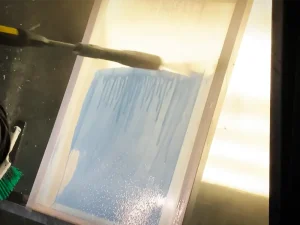
During screen printing, we generally pour more ink on the screen. Right? This ink is then pressed through a squeegee, and some of it passes through the tiny holes in the mesh onto the fabrics. However, some ink, in high quantities, remains on the screen and is not transferred to the fabric.
The first step should be to remove the excessive ink left on the screen. Interestingly, removing this excess is easier if you squeeze and scrape excess ink into the container. This process should be conducted immediately once some ink has passed through the mesh and has been applied to the fabric. If you delay, the ink will dry, making it difficult to remove later.
2- Use Ink Remover and Wipe the Mesh
After removing the excess ink, you’ll need to clean the screen’s mesh. The mesh is usually made of polyester fabric, which can hold onto ink. To remove this ink, you should use an ink remover. This liquid-based solution weakens the bond between the ink and the mesh material.
It’s applied to the mesh surface after the excess ink has been scraped into the container. After applying the ink remover, use a sponge to carefully wipe the mesh. This wiping will remove both the ink remover and any remaining ink from the mesh. During this cleaning, I recommend wiping gently, as a harsh approach can damage the mesh.
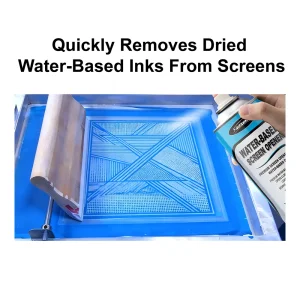
Quick Note: Use a water-based screen opener on the screen’s mesh. This will ensure that the ink does not dry up on the mesh and flows smoothly. This can be done either during printing or immediately after. During printing, the ink won’t clog the tiny holes; it will flow through them to create a design.
3- Rinse the Screen with Water
Using an ink remover is very effective for removing most of the ink from the mesh. However, it is best to rinse the screen with water to ensure the ink is completely removed. Many people don’t rinse the screen with water and consider it fine to have a little ink on the screen. However, rinsing the screen with water is easy and makes the screen and mesh very clear. This rinsing is essential when you create designs with ultra-fine detail. You should generally rinse the screen with water.
4- Apply Emulsion Remover and Rinse Out the Emulsion
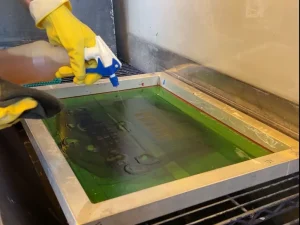
The screen printing process uses emulsion during the design process. Emulsion is a liquid coating applied to the screen mesh. Remember, emulsion is light-sensitive, which means it dries when exposed to light. During the screen cleaning, you must remove the emulsion to reclaim the screen for a new design.
If you don’t clean it, the old design will remain on the screen, making it unusable. For the emulsion, you can use a dedicated emulsion remover chemical. This remover will weaken the emulsion on the mesh and break it down. Ideally, the emulsion remover should be left on for at least 10 minutes before rinsing.
After 10 minutes, you can simply take a brush and scrub off the broken emulsion from the screen. If you don’t have a brush, using water and rinsing the screen will work just fine. In fact, rinsing the screen also removes any ink stains. If the stains remain on the screen, they can cause ghost images when you print a new design.
Quick Note: The emulsion remover should not remain on the screen for long during cleaning. That’s because this chemical can dry quickly on the screen’s surface. So removing the dried emulsion remover would be very challenging. In this case, you’ll use a harsh approach or rubbing. This degrades the mesh’s quality and can cause it to be damaged. You should wash this chemical before it dries.
5- Degrease and Air-dry the Screen
Degreasing is the final step in cleaning the screen. You might hear that degreasing is not mandatory and that it takes time, too. So, it should be avoided; however, I don’t recommend skipping this step. Why? That’s because degreasing removes even those contaminants that are not visible to the naked eye.
Even though the screen and its mesh look clean, they may still have some oil or leftover ink. During cleaning, we also use an emulsion remover that can remain on the surface but isn’t visible. So using a degreaser ensures those contaminants are removed. In this process, you’ll need to apply degreaser to the screen’s surface, including the mesh. One thing to remember is that the surface where you use the degreaser must be wet.
Therefore, in the previous step, I mentioned rinsing the emulsion remover off, as it would make the surface wet. So, applying the degreasing agent would be easier. This degreaser should be applied to all sides of the mesh. Once done, you should leave the screen to air-dry. It is crucial to keep the screen in a dust- and contaminant-free area. Once the screen air-dries, it is perfectly cleaned and is ready to be used again.
Types of Screen Contaminants
Screen printing is a beneficial process for creating designs on fabrics or clothing. The quality of the prints largely depends on the screen’s cleanliness. If the screen has any contaminants, it will produce low-quality prints, and vice versa. Here is a list of some contaminants:
- Dried emulsions
- Ink, either wet or dried
- Stains, primarily from dried ink.
- Invisible finger spots or oil layers on the mesh of the screen.
- Chemicals (ink remover, emulsion remover) – Each of them must be removed for the best result.
Manual vs Pressure Washing for Cleaning a Screen Printing Screen
As mentioned above, cleaning screens requires rinsing and washing with ink and emulsion removers. In that regard, there are two major washing types, which are as follows:
- Manual Washing
- Pressure Washing
As the name suggests, manual washing involves using your hands and brushes to remove the chemicals. Manual screen cleaning is slow but offers more control and ensures quality. On the other hand, pressure washing is different because it depends on the dedicated pressure washer.
This method is fast, but it can compromise quality under high pressure. The pressure washers release high-pressure water, which can affect the screen mesh. I would recommend a manual method, as it offers better safety and control. If you use the pressure washer, make sure the water pressure remains below 1000 psi.
Conclusion
In summary, cleaning the printing screen is crucial. Using a cleaned screen helps make designs with precision and ensures the utmost quality. Screens with dried ink in the mesh can make the design bolder. You should never use an uncleaned one when creating a design that requires fine details. In this article, I explain the complete cleaning process in five practical steps. Each of the steps mentioned above is equally important. You should not skip any of these steps; otherwise, your screen won’t be clean, which will compromise design quality.